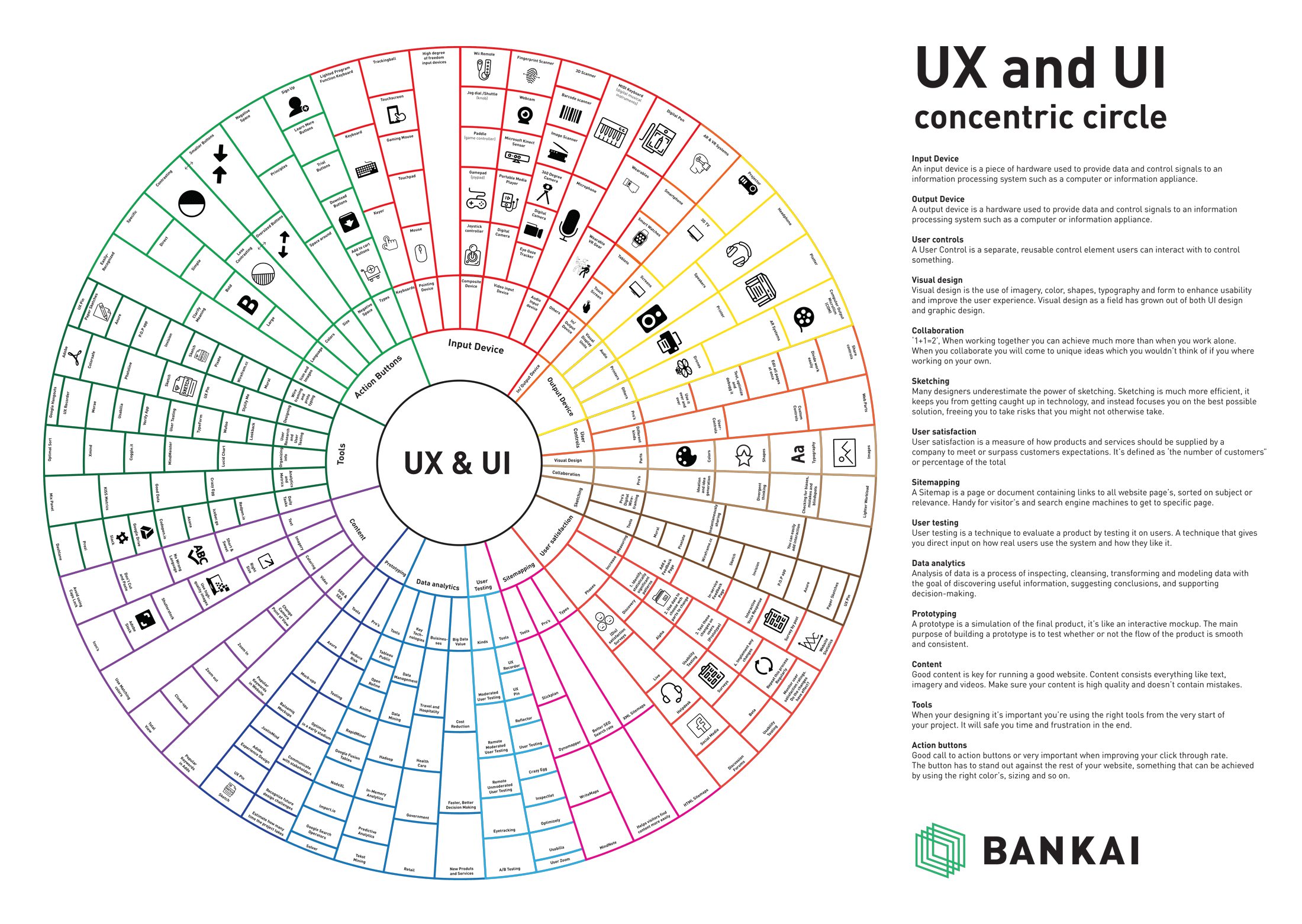
The elements of UX Design is a neat mental model to understand how all the pieces of design link together to deliver the user experience. This elements of UX design infographic from Bankai illustrates not only the elements but how it integrates with UI design.
If you’re confused between UX and UI then you’re not alone. There are loads of terms in design that have sprung up and often leave a layperson wondering what they are about.
In simple terms, UX Design refers to the term User Experience Design, whereas UI Design stands for User Interface Design.
Table of Contents
What Is UX Design?
Don Norman, a cognitive scientist and co-founder of the Nielsen Norman Group Design Consultancy, is credited with inventing the term in the late 1990’s.
“User experience encompasses all aspects of the end-user’s interaction with the company, its services, and its products.”
- User Experience Design is the process of development and improvement of quality interaction between a user and all facets of a company.
- User Experience Design is responsible for being hands-on with the process of research, testing, development, content, and prototyping to test for quality results.
- User Experience Design is, in theory, a non-digital (cognitive science) practise, but used and defined predominantly by digital industries.
As UX design has evolved so too have the tools to help understand customers at a much deeper level. As an example, a customer journey map canvas can be used to map touchpoints and understand how customers reacted to them.
Understanding the elements of UX design involves a mix of psychology, social sciences, design and marketing.
What is UI Design?
User Interface Design is also a multi-disciplinary role.
It is responsible for the development of a product’s development, research, content and layout into an attractive, guiding and responsive experience for users.
User Interface Design is also a field that unlike UX, is mainly a digital profession, as per its dictionary definition.
- User Interface Design is responsible for the transference of a brand’s strengths and visual assets to a product’s interface as to best enhance the user’s experience.
- User Interface Design is a process of visually guiding the user through a product’s interface via interactive elements and across all sizes/platforms.
- User Interface Design is a digital field, which includes responsibility for cooperation and works with developers or code.
Here is an easy visual way to think of the difference between them.

Elements of UX Design
Much of the original focus of UX design was, and in some instances still is, based on web design.
However, the impact and value of user experience design extends far beyond the context of the Web.
Each interaction with a company involves an element of UX design.
What’s the difference between designing a product and designing a user experience? Many products have multiple variations and are sold through multiple channels.
The more complex the product the more information that people need to make a decision to buy. However, overloading customers with too much information in one go creates a bad experience.
Layering the information, mapping the user experience and understanding the customer’s decision-making process is critical to effective UX design.
Presenting this information so that it makes it easy for customers to understand is important.
On a wider and more strategic level, the environment in which the user investigates information about a product is a part of the user experience, from a chat on a website to the pdf downloaded on product features to the video showing it.
Products purchased often need support, instructions and so involve many more contextual points for interaction with a user beyond the product itself.
The user experience extends beyond the transaction. Despite this many companies don’t plan beyond the transaction point.
By using the growth marketing blueprint canvas you can start the process of evolving your UX design thinking and planning to how you retain customers.
The Original Elements of UX Design Explained

The diagram above was initially conceived by There are five dependent layers, each level builds on the level before it, and they start with abstract level towards concrete one(from bottom to top).
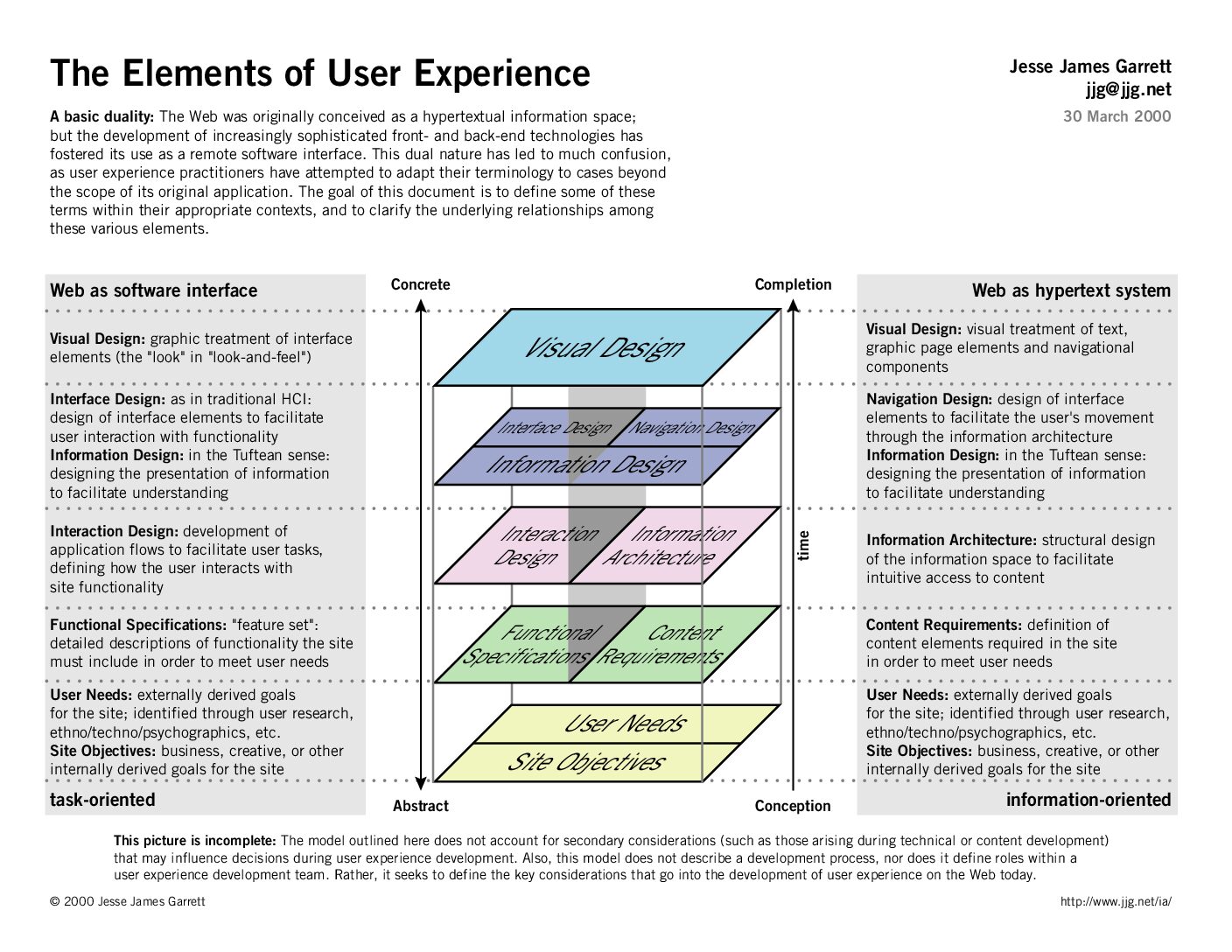
- Strategy
- Scope
- Structure
- Skeleton
- Surface
#1. Elements of UX Design – Strategy
Strategy defines what the experience must achieve both for users and for the business. At this foundational layer, product teams commit to clarity of purpose. They don’t start with features; they start with needs. The core question is not “what should we build?” but “why will anyone care?”
This stage often reveals a sobering truth: most digital failures aren’t due to execution but to misalignment. A product can be flawlessly built and still fail simply because it solves a problem no one prioritizes or supports a business goal that doesn’t translate to user value.
Strategy bridges this gap. It forces teams to surface assumptions, challenge internal bias, and build alignment between user goals and business objectives. Without this alignment, everything above e.g., design, interface, branding then collapses into incoherence.
At this level, teams must:
- Identify User Needs: This means gathering real behavioral evidence, not relying on stakeholder intuition or proxy personas.
- Define Business Goals: The product must support a measurable business outcome—whether growth, engagement, retention, or efficiency.
- Establish Success Metrics: If success isn’t defined early, teams will chase surface-level wins while strategic value remains unmeasured.
- Resolve Trade-offs: Strategy requires hard choices. You can’t optimize for every user, every scenario, or every department. Priority becomes product.
The strategy plane doesn’t dictate what users see, but it determines whether what they see will matter. A strong strategy doesn’t just support good design, it makes good design inevitable.
This could be done through a number of different Strategic Research Processes.
Key Questions
- What real user need are we addressing, based on behavioral evidence?
- How will this experience deliver measurable value to the business?
- What assumptions must we validate before committing to a direction?
Key Tips and Tools
• Use Jobs to Be Done and Customer Journey Mapping to uncover functional, emotional, and social needs
• Align success metrics early using OKRs (Objectives and Key Results) or outcome mapping
• Create a clear vision statement that explicitly connects user goals to business outcomes
#2. Elements of UX Design – Scope
Scope defines the boundaries of what the product will include. It translates strategic goals into specific functional and content requirements. A clear scope prevents feature creep, accelerates alignment across teams, and ensures the product delivers measurable value to both users and the business.
Key focus areas at the scope stage include:
• Functional requirements such as search, login, or data input that enable user tasks
• Content requirements including text, images, and media necessary for communication
• Priority decisions that rank features based on user need, technical feasibility, and strategic relevance
• Explicit exclusions to avoid resource waste and prevent distractions from core objectives
• Alignment checks that confirm every item in scope supports the original strategy
Strong scope keeps teams focused. It ensures that every design decision serves a defined purpose.
Key Questions
- What features and content are essential to meet user needs and strategic objectives?
- What criteria are we using to prioritize what goes into scope now versus later?
- What will we deliberately exclude to protect focus and execution speed?
Key Tips and Tools
• Use a MoSCoW matrix (Must, Should, Could, Won’t) to prioritize features
• Collaboratively define acceptance criteria to clarify what “done” looks like
• Maintain a product backlog that tracks trade-offs and scope evolution across sprints
#3. Elements of UX Design – Structure
Defines how a user interacts with the product, how the system behaves when the user interacts, how it’s organised, prioritised, and how much of it.
The structure is split into two components, Interaction Design & Information Architecture.
- helps people to accomplish their goals.
- effectively communicates interactivity and functionality(what user can do).
- informs the user about state changes(the file has been saved, or any feedback), while they interact.
- prevents user error or mistakes, like the system asks the user to confirm potentially harmful action(i.e. deletion).
Good Information Architecture
- organises, categorises, and prioritises the information based on user needs and business objectives.
- makes it easy to understand and move through the information presented.
- flexible to accommodate growth and adapt to change.
- appropriate for the audience.
Key Questions
- What is the most logical flow of tasks and information for the user?
- How do we structure content and interactions to reduce friction and ambiguity?
- Where might users drop off or feel lost in the experience?
Key Tips and Tools
• Create user flows or journey maps to visualize end-to-end interactions
• Apply information architecture methods like card sorting to organize content
• Use navigation patterns that match established mental models (e.g., hub-and-spoke, step-by-step)
#4. Elements of UX Design – Skeleton
The skeleton defines how users will interact with the system. It shapes the placement of buttons, menus, and pathways, translating structure into interface. This layer guides behavior, clarifies navigation, and makes the experience usable before it becomes visually refined.
Key priorities at the skeleton level include:
• Interface design that places elements where users expect them and supports efficient task flow
• Navigation systems that orient users, reduce confusion, and create logical movement across content
• Information layout that structures content for clarity, emphasis, and ease of scanning
• Responsiveness planning that adapts layouts to different screen sizes and device conditions
• Feedback mechanisms that confirm user actions and support real-time decision-making
The skeleton makes the system navigable. Without it, even the most beautiful interface will confuse or frustrate.
Key Questions
- Does the placement of elements support fast, error-free task completion?
- Are navigation and content layouts consistent across the experience?
- How does the layout guide attention to what matters most?
Key Tips and Tools
• Prototype with tools like Figma, Sketch, or Axure to test layout behavior
• Apply Gestalt principles (proximity, similarity, continuity) to structure UI logic
• Conduct wireframe-based usability testing before adding visual design
#5. Elements of UX Design – Surface
The skeleton defines the experience users feel but don’t consciously see. At this level, the structure becomes concrete: interface elements gain shape, navigation systems align with user intent, and information flows in patterns designed for efficiency and clarity. This is not layout for its own sake, it’s layout in service of cognition.
Designers at this stage make the system navigable before it becomes beautiful. They prioritize motion paths, reduce user friction, and create scaffolds that anticipate real-time behavior. The skeleton aligns internal architecture with the user’s mental model—turning abstract decisions into actionable frames.
Strategic components of the skeleton layer include:
- Interface Design: Designers decide where and how users interact—buttons, input fields, and controls become tactical instruments, not decorative elements.
- Navigation Design: They construct intuitive journeys by mapping entry points, pathways, and return loops that support goal completion.
- Information Design: They ensure every page speaks in the right sequence—guiding attention through typographic hierarchy, groupings, and proximity.
- Responsive Logic: They build for flow, not just form—ensuring adaptability across screens, contexts, and interruptions.
- Feedback Systems: They hardwire trust into the interface by signaling status, confirming actions, and preventing user errors in real time.
Fail at the skeleton, and the surface won’t save you. Users don’t remember layout; they remember friction.
Key Questions
- Does the visual design reinforce the brand and clarify interaction intent?
- Are visual elements like color, type, and spacing used to create hierarchy and trust?
- Does the interface feel intuitive and consistent across touchpoints?
Key Tips and Tools
• Use a component-based design system to ensure visual consistency
• Leverage accessibility tools (like Stark or WAVE) to validate contrast, readability, and tap targets
• Test visual prototypes with real users to evaluate emotional response and clarity
Elements of UX Design Infographic
User experience is not about the inner workings of a product or service. User experience is about how it works on the outside, where a person comes into contact with it. When someone asks you what it’s like to use a product or service, they’re asking about the user experience. Is it hard to do simple things? Is it easy to figure out? How does it feel to interact with the product?
This infographic explores some of the tools, devices, controls, visual design, site mapping involved in the UX design elements.